


GeForce Hotfix driver
版本編號: 621.35 WHQL (r621_20-3)
發佈日期: 2026年11月20日
作業系統: Windows 10 / 11 (僅x64的DCH版;包含筆記本的支援)
支援語系: 多國語言版
此版驅動程式是來至官方知識庫的支援文件:
文件編號: 5940
更新時間: 11/20/2026 01:54 PM
發行重點
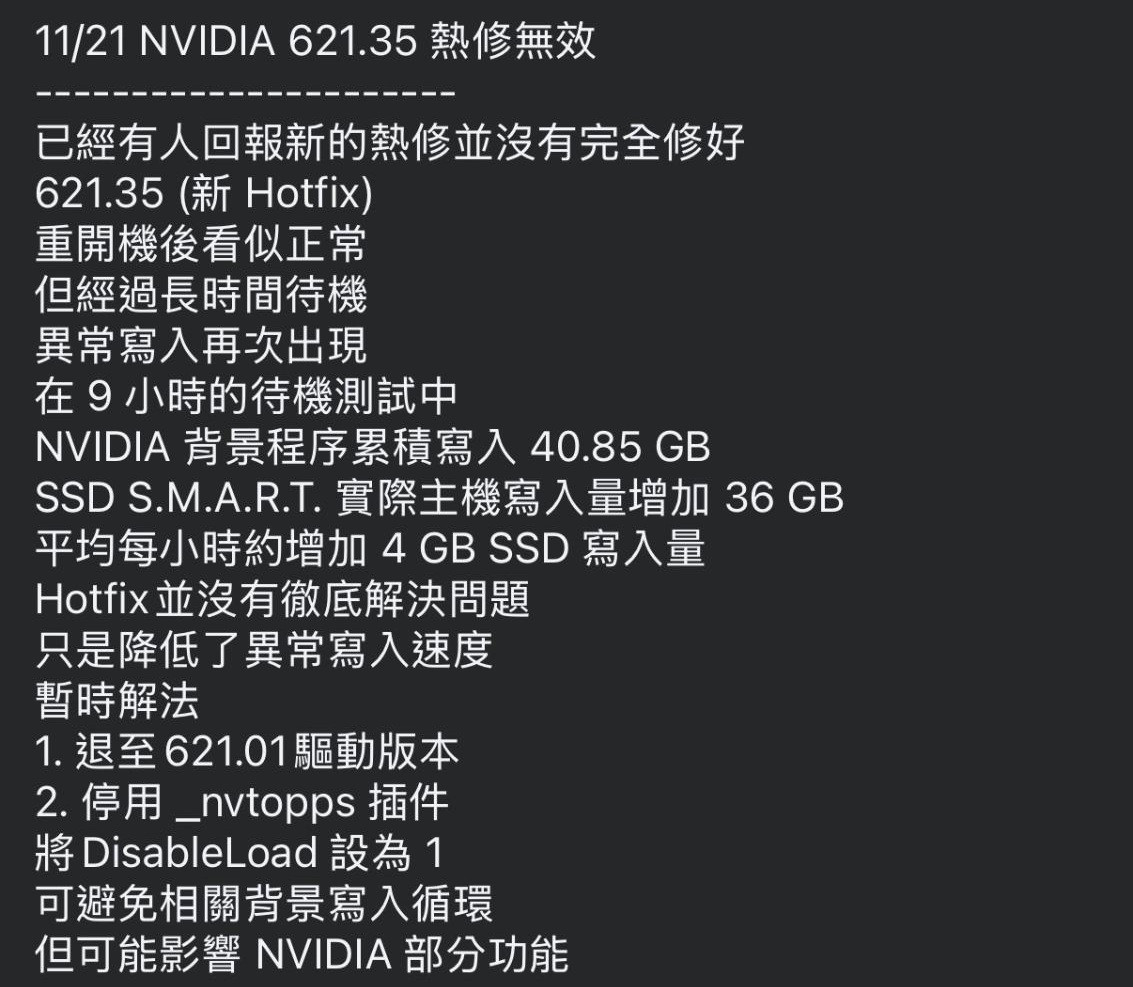
• 此621.35版驅動程式是基於最新遊戲準備驅動程式621.24的錯誤修復,此修正版驅動程式已解決某些問題。
此版已修復的問題:
• 在背景中可能會對nvlog.nvlgstg檔案持續異常寫入。
驅動元件:
R621.35 (r621_20-3) / 32.0.16.2135 (11-19-2026)
DirectX 12.2
Shader Model 6.8
CUDA 13.5.49
OpenGL 4.6
OpenCL 3.0
Vulkan API 1.4.357
HD Audio 1.4.6.6
APP 11.0.9.585
PhysX 9.26.0904
USBC 1.52.831.832

驅動核心編號對照表:
R621.12 Hotfix (r620_97-9)
R621.01 WHQL (r620_97-3)
R617.70 Hotfix (r617_07-44)
此版驅動程式的官方討論串: (英文)
資訊來源網頁
此版驅動程式的Guru3D討論串: (英文)
資訊來源網頁
驅動程式問題的回報窗口: (建議使用英文填寫,或是利用谷歌翻譯先將您的回答轉換成英文)
資訊來源網頁
下載檔案: (雙下載點,任選其一)
Win10&11-64bit (DCH版;包含筆記本的支援)
Win10&11-64bit (DCH版;包含筆記本的支援)
產品支援清單:
NVIDIA Blackwell 系列:
NVIDIA GeForce RTX 5090, NVIDIA GeForce RTX 5090D, NVIDIA GeForce RTX 5080, NVIDIA GeForce RTX 5070 Ti, NVIDIA GeForce RTX 5070, NVIDIA GeForce RTX 5060 Ti, NVIDIA GeForce RTX 5060, NVIDIA GeForce RTX 5050
NVIDIA Ada Lovelace 系列:
NVIDIA GeForce RTX 4090, NVIDIA GeForce RTX 4080 SUPER, NVIDIA GeForce RTX 4080, NVIDIA GeForce RTX 4070 Ti SUPER, NVIDIA GeForce RTX 4070 Ti, NVIDIA GeForce RTX 4070 SUPER, NVIDIA GeForce RTX 4070, NVIDIA GeForce RTX 4060 Ti, NVIDIA GeForce RTX 4060
NVIDIA Ampere 系列:
NVIDIA GeForce RTX 3090 Ti, NVIDIA GeForce RTX 3090, NVIDIA GeForce RTX 3080 Ti, NVIDIA GeForce RTX 3080, NVIDIA GeForce RTX 3070 Ti, NVIDIA GeForce RTX 3070, NVIDIA GeForce RTX 3060 Ti, NVIDIA GeForce RTX 3060, NVIDIA GeForce RTX 3050, NVIDIA GeForce RTX 2050
Turing 系列:
NVIDIA TITAN RTX, NVIDIA GeForce RTX 2080 Ti, NVIDIA GeForce RTX 2080 SUPER, NVIDIA GeForce RTX 2080, NVIDIA GeForce RTX 2070 SUPER, NVIDIA GeForce RTX 2070, NVIDIA GeForce RTX 2060 SUPER, NVIDIA GeForce RTX 2060, GeForce GTX 1660 SUPER, GeForce GTX 1660 Ti, GeForce GTX 1660 GeForce GTX 1650 SUPER, GeForce GTX 1650, GeForce GTX 1630
NVIDIA Blackwell 系列: (Notebook)
NVIDIA GeForce RTX 5090 Notebook, NVIDIA GeForce RTX 5080 Notebook, NVIDIA GeForce RTX 5070 Ti Notebook, NVIDIA GeForce RTX 5060 Notebook, NVIDIA GeForce RTX 5050 Notebook
NVIDIA Ada Lovelace 系列: (Notebook)
GeForce RTX 4090 Laptop GPU, GeForce RTX 4080 Laptop GPU, GeForce RTX 4070 Laptop GPU, GeForce RTX 4060 Laptop GPU, GeForce RTX 4050 Laptop GPU
NVIDIA Ampere 系列: (Notebook)
GeForce RTX 3080 Ti Laptop GPU, GeForce RTX 3080 Laptop GPU, GeForce RTX 3070 Ti Laptop GPU, GeForce RTX 3070 Laptop GPU, GeForce RTX 3060 Laptop GPU, GeForce RTX 3050 Ti Laptop GPU, GeForce RTX 3050 Laptop GPU
Turing 系列: (Notebook)
GeForce RTX 2080 SUPER Max-Q, GeForce RTX 2080 SUPER, GeForce RTX 2080, GeForce RTX 2070, GeForce RTX 2060, GeForce GTX 1660 Ti, GeForce GTX 1650, GeForce MX450
Pascal 系列: (Notebook)
GeForce MX350, GeForce MX330, GeForce MX250, GeForce MX230, GeForce MX150
版本編號: 621.35 WHQL (r621_20-3)
發佈日期: 2026年11月20日
作業系統: Windows 10 / 11 (僅x64的DCH版;包含筆記本的支援)
支援語系: 多國語言版
此版驅動程式是來至官方知識庫的支援文件:
文件編號: 5940
更新時間: 11/20/2026 01:54 PM
發行重點
• 此621.35版驅動程式是基於最新遊戲準備驅動程式621.24的錯誤修復,此修正版驅動程式已解決某些問題。
此版已修復的問題:
• 在背景中可能會對nvlog.nvlgstg檔案持續異常寫入。
驅動元件:
R621.35 (r621_20-3) / 32.0.16.2135 (11-19-2026)
DirectX 12.2
Shader Model 6.8
CUDA 13.5.49
OpenGL 4.6
OpenCL 3.0
Vulkan API 1.4.357
HD Audio 1.4.6.6
APP 11.0.9.585
PhysX 9.26.0904
USBC 1.52.831.832
驅動核心編號對照表:
R621.12 Hotfix (r620_97-9)
R621.01 WHQL (r620_97-3)
R617.70 Hotfix (r617_07-44)
此版驅動程式的官方討論串: (英文)
資訊來源網頁
此版驅動程式的Guru3D討論串: (英文)
資訊來源網頁
驅動程式問題的回報窗口: (建議使用英文填寫,或是利用谷歌翻譯先將您的回答轉換成英文)
資訊來源網頁
下載檔案: (雙下載點,任選其一)
Win10&11-64bit (DCH版;包含筆記本的支援)
Win10&11-64bit (DCH版;包含筆記本的支援)
產品支援清單:
NVIDIA Blackwell 系列:
NVIDIA GeForce RTX 5090, NVIDIA GeForce RTX 5090D, NVIDIA GeForce RTX 5080, NVIDIA GeForce RTX 5070 Ti, NVIDIA GeForce RTX 5070, NVIDIA GeForce RTX 5060 Ti, NVIDIA GeForce RTX 5060, NVIDIA GeForce RTX 5050
NVIDIA Ada Lovelace 系列:
NVIDIA GeForce RTX 4090, NVIDIA GeForce RTX 4080 SUPER, NVIDIA GeForce RTX 4080, NVIDIA GeForce RTX 4070 Ti SUPER, NVIDIA GeForce RTX 4070 Ti, NVIDIA GeForce RTX 4070 SUPER, NVIDIA GeForce RTX 4070, NVIDIA GeForce RTX 4060 Ti, NVIDIA GeForce RTX 4060
NVIDIA Ampere 系列:
NVIDIA GeForce RTX 3090 Ti, NVIDIA GeForce RTX 3090, NVIDIA GeForce RTX 3080 Ti, NVIDIA GeForce RTX 3080, NVIDIA GeForce RTX 3070 Ti, NVIDIA GeForce RTX 3070, NVIDIA GeForce RTX 3060 Ti, NVIDIA GeForce RTX 3060, NVIDIA GeForce RTX 3050, NVIDIA GeForce RTX 2050
Turing 系列:
NVIDIA TITAN RTX, NVIDIA GeForce RTX 2080 Ti, NVIDIA GeForce RTX 2080 SUPER, NVIDIA GeForce RTX 2080, NVIDIA GeForce RTX 2070 SUPER, NVIDIA GeForce RTX 2070, NVIDIA GeForce RTX 2060 SUPER, NVIDIA GeForce RTX 2060, GeForce GTX 1660 SUPER, GeForce GTX 1660 Ti, GeForce GTX 1660 GeForce GTX 1650 SUPER, GeForce GTX 1650, GeForce GTX 1630
NVIDIA Blackwell 系列: (Notebook)
NVIDIA GeForce RTX 5090 Notebook, NVIDIA GeForce RTX 5080 Notebook, NVIDIA GeForce RTX 5070 Ti Notebook, NVIDIA GeForce RTX 5060 Notebook, NVIDIA GeForce RTX 5050 Notebook
NVIDIA Ada Lovelace 系列: (Notebook)
GeForce RTX 4090 Laptop GPU, GeForce RTX 4080 Laptop GPU, GeForce RTX 4070 Laptop GPU, GeForce RTX 4060 Laptop GPU, GeForce RTX 4050 Laptop GPU
NVIDIA Ampere 系列: (Notebook)
GeForce RTX 3080 Ti Laptop GPU, GeForce RTX 3080 Laptop GPU, GeForce RTX 3070 Ti Laptop GPU, GeForce RTX 3070 Laptop GPU, GeForce RTX 3060 Laptop GPU, GeForce RTX 3050 Ti Laptop GPU, GeForce RTX 3050 Laptop GPU
Turing 系列: (Notebook)
GeForce RTX 2080 SUPER Max-Q, GeForce RTX 2080 SUPER, GeForce RTX 2080, GeForce RTX 2070, GeForce RTX 2060, GeForce GTX 1660 Ti, GeForce GTX 1650, GeForce MX450
Pascal 系列: (Notebook)
GeForce MX350, GeForce MX330, GeForce MX250, GeForce MX230, GeForce MX150
最後編輯: