



GeForce Game Ready & Studio Driver
版本編號: 616.56 WHQL (r616_41-256)
發佈日期: 2026年8月26日
作業系統: Windows 10 / 11 (僅x64的DCH版)
支援語系: 多國語言版
發行重點
• 此版GeForce Game Ready驅動程式可在最新遊戲中最佳化,並支援DLSS、光線追蹤、路徑追蹤和NVIDIA Reflex等技術,以確保您能在更廣泛的遊戲和APP中獲得最佳體驗。
遊戲支援
• 為STAR WARS Zero Company(星際大戰:零號連隊)、Resonance: A Plague Tale Legacy(瘟疫傳說:共鳴)、Hell Let Loose: Vietnam(集火地獄:越南)提供DLSS和RTX技術的最佳遊戲體驗。
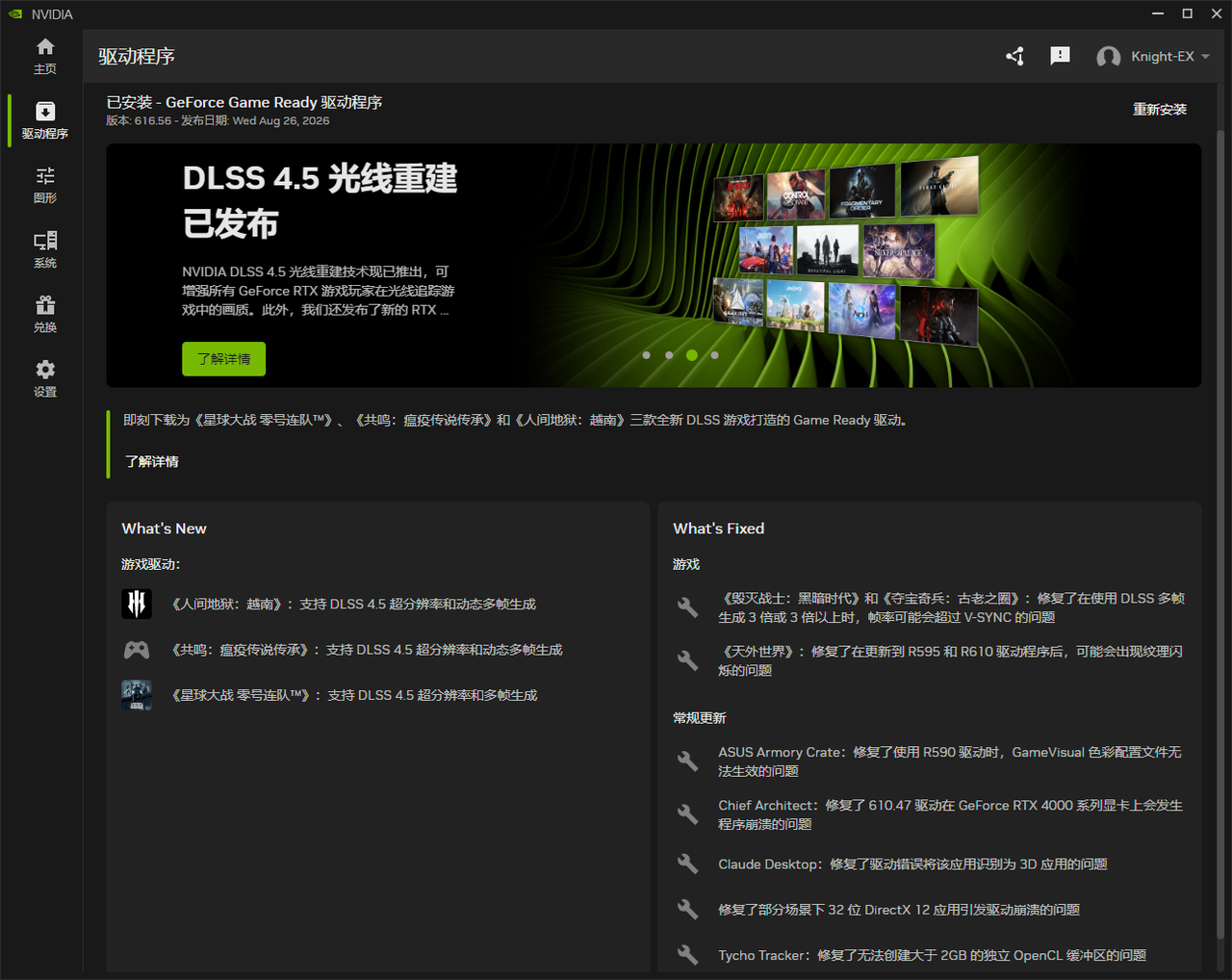

此版已修復的遊戲問題:
• DOOM: The Dark Ages(毀滅戰士:黑暗時代)/Indiana Jones and the Great Circle(印第安納瓊斯:古老之圈):當使用DLSS幀產生3倍或更高時,幀速率可能會超過V-SYNC。[6061475]
• Outer Worlds(天外世界):更新到R595和R610驅動程式後,在玩遊戲時可能會出現紋理閃爍。[6238668]
此版已修復的一般問題:
• ASUS Armory Crate:使用R590驅動程式時,GameVisual色彩設定檔無法套用。[5860581]
• Chief Architect:GeForce RTX 4000 系列顯示卡上的610.47驅動程式崩潰。[6226227
• Claude Desktop:驅動程式錯誤地將應用程式偵測為3D應用程式。[6468260]
• 解決某些實例可能會導致32位元DirectX 12應用程式的驅動程式崩潰問題。[5725350]
• Tycho Tracker:無法建立大於2GB的單一OpenCL緩衝區。[6538978]
未解決的已知問題:
• 電源管理模式的"慣用的最大效能"可能不會被正確套用。[6007998]
驅動元件:
R616.56 (r616_41-256) / 32.0.16.1656 (8-20-2026)
DirectX 12.2
Shader Model 6.8
CUDA 13.4.62
OpenGL 4.6
OpenCL 3.0
Vulkan API 1.4.351
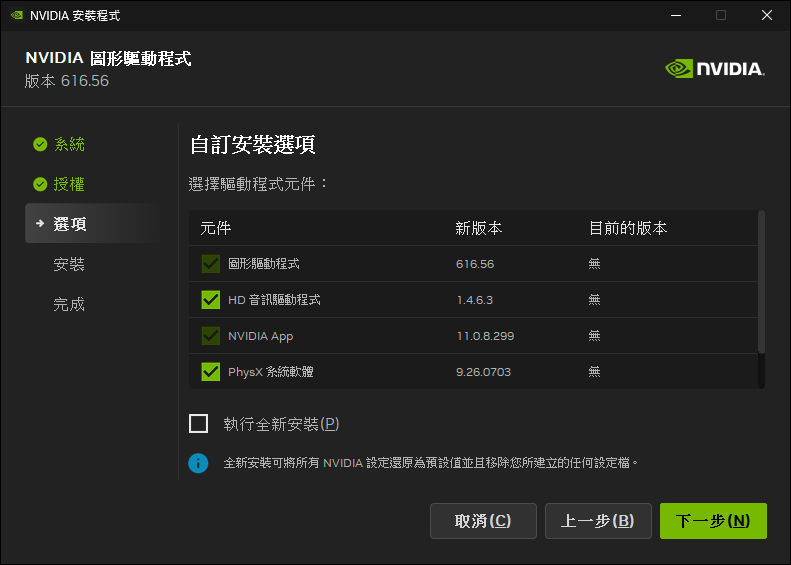
HD Audio 1.4.6.3
APP 11.0.8.299
PhysX 9.26.0703
USBC 1.52.831.832
驅動核心編號對照表:
R616.56 WHQL (r616_41-256)
R610.88 WHQL (r610_85-151)
R610.82 Hotfix (r610_74-3)
此版驅動程式的更新文件: (英文)
資訊來源網頁
此版驅動程式的官方討論串: (英文)
資訊來源網頁
此版驅動程式的Guru3D討論串: (英文)
資訊來源網頁
驅動程式問題的回報窗口: (建議使用英文填寫,或是利用谷歌翻譯先將您的回答轉換成英文)
資訊來源網頁
下載網頁:
Win10&Win11-64bit (DCH版)
Win10&Win11-64bit (Notebook;DCH版)
Win10&Win11-64bit (Studio/DCH版)
Win10&Win11-64bit (Notebook;Studio/DCH版)
下載檔案:
Win10&Win11-64bit (DCH版)
Win10&Win11-64bit (Notebook;DCH版)
Win10&Win11-64bit (Studio/DCH版)
Win10&Win11-64bit (Notebook;Studio/DCH版)
產品支援清單:
GeForce RTX 50 系列
GeForce RTX 5090 D v2, GeForce RTX 5090 D, GeForce RTX 5090, GeForce RTX 5080, GeForce RTX 5070 Ti, GeForce RTX 5070, GeForce RTX 5060 Ti, GeForce RTX 5060, GeForce RTX 5050
GeForce RTX 40 系列
GeForce RTX 4090 D, GeForce RTX 4090, GeForce RTX 4080 SUPER, GeForce RTX 4080, GeForce RTX 4070 Ti SUPER, GeForce RTX 4070 Ti, GeForce RTX 4070 SUPER, GeForce RTX 4070, GeForce RTX 4060 Ti, GeForce RTX 4060
GeForce RTX 30 系列
GeForce RTX 3090 Ti, GeForce RTX 3090, GeForce RTX 3080 Ti, GeForce RTX 3080, GeForce RTX 3070 Ti, GeForce RTX 3070, GeForce RTX 3060 Ti, GeForce RTX 3060, GeForce RTX 3050
GeForce RTX 20 系列
GeForce RTX 2080 Ti, GeForce RTX 2080 SUPER, GeForce RTX 2080, GeForce RTX 2070 SUPER, GeForce RTX 2070, GeForce RTX 2060 SUPER, GeForce RTX 2060
NVIDIA TITAN 系列
NVIDIA TITAN RTX
GeForce 16 系列
GeForce GTX 1660 SUPER, GeForce GTX 1650 SUPER, GeForce GTX 1660 Ti, GeForce GTX 1660, GeForce GTX 1650, GeForce GTX 1630
GeForce RTX 50 系列 (Notebooks)
GeForce RTX 5090 Laptop GPU, GeForce RTX 5080 Laptop GPU, GeForce RTX 5070 Ti Laptop GPU, GeForce RTX 5070 Laptop GPU, GeForce RTX 5060 Laptop GPU, GeForce RTX 5050 Laptop GPU
GeForce RTX 40 系列 (Notebooks)
GeForce RTX 4090 Laptop GPU, GeForce RTX 4080 Laptop GPU, GeForce RTX 4070 Laptop GPU, GeForce RTX 4060 Laptop GPU, GeForce RTX 4050 Laptop GPU
GeForce RTX 30 系列 (Notebooks)
GeForce RTX 3080 Ti Laptop GPU, GeForce RTX 3080 Laptop GPU, GeForce RTX 3070 Ti Laptop GPU, GeForce RTX 3070 Laptop GPU, GeForce RTX 3060 Laptop GPU, GeForce RTX 3050 Ti Laptop GPU, GeForce RTX 3050 Laptop GPU
GeForce RTX 20 系列 (Notebooks)
GeForce RTX 2080 SUPER, GeForce RTX 2080, GeForce RTX 2070 SUPER, GeForce RTX 2070, GeForce RTX 2060, GeForce RTX 2050
GeForce MX500 系列 (Notebooks)
GeForce MX570, GeForce MX550
GeForce MX400 系列 (Notebooks)
GeForce MX450
GeForce GTX 16 系列 (Notebooks)
GeForce GTX 1660 Ti, GeForce GTX 1650 Ti, GeForce GTX 1650
版本編號: 616.56 WHQL (r616_41-256)
發佈日期: 2026年8月26日
作業系統: Windows 10 / 11 (僅x64的DCH版)
支援語系: 多國語言版
發行重點
• 此版GeForce Game Ready驅動程式可在最新遊戲中最佳化,並支援DLSS、光線追蹤、路徑追蹤和NVIDIA Reflex等技術,以確保您能在更廣泛的遊戲和APP中獲得最佳體驗。
遊戲支援
• 為STAR WARS Zero Company(星際大戰:零號連隊)、Resonance: A Plague Tale Legacy(瘟疫傳說:共鳴)、Hell Let Loose: Vietnam(集火地獄:越南)提供DLSS和RTX技術的最佳遊戲體驗。
此版已修復的遊戲問題:
• DOOM: The Dark Ages(毀滅戰士:黑暗時代)/Indiana Jones and the Great Circle(印第安納瓊斯:古老之圈):當使用DLSS幀產生3倍或更高時,幀速率可能會超過V-SYNC。[6061475]
• Outer Worlds(天外世界):更新到R595和R610驅動程式後,在玩遊戲時可能會出現紋理閃爍。[6238668]
此版已修復的一般問題:
• ASUS Armory Crate:使用R590驅動程式時,GameVisual色彩設定檔無法套用。[5860581]
• Chief Architect:GeForce RTX 4000 系列顯示卡上的610.47驅動程式崩潰。[6226227
• Claude Desktop:驅動程式錯誤地將應用程式偵測為3D應用程式。[6468260]
• 解決某些實例可能會導致32位元DirectX 12應用程式的驅動程式崩潰問題。[5725350]
• Tycho Tracker:無法建立大於2GB的單一OpenCL緩衝區。[6538978]
未解決的已知問題:
• 電源管理模式的"慣用的最大效能"可能不會被正確套用。[6007998]
驅動元件:
R616.56 (r616_41-256) / 32.0.16.1656 (8-20-2026)
DirectX 12.2
Shader Model 6.8
CUDA 13.4.62
OpenGL 4.6
OpenCL 3.0
Vulkan API 1.4.351
HD Audio 1.4.6.3
APP 11.0.8.299
PhysX 9.26.0703
USBC 1.52.831.832
驅動核心編號對照表:
R616.56 WHQL (r616_41-256)
R610.88 WHQL (r610_85-151)
R610.82 Hotfix (r610_74-3)
此版驅動程式的更新文件: (英文)
資訊來源網頁
此版驅動程式的官方討論串: (英文)
資訊來源網頁
此版驅動程式的Guru3D討論串: (英文)
資訊來源網頁
驅動程式問題的回報窗口: (建議使用英文填寫,或是利用谷歌翻譯先將您的回答轉換成英文)
資訊來源網頁
下載網頁:
Win10&Win11-64bit (DCH版)
Win10&Win11-64bit (Notebook;DCH版)
Win10&Win11-64bit (Studio/DCH版)
Win10&Win11-64bit (Notebook;Studio/DCH版)
下載檔案:
Win10&Win11-64bit (DCH版)
Win10&Win11-64bit (Notebook;DCH版)
Win10&Win11-64bit (Studio/DCH版)
Win10&Win11-64bit (Notebook;Studio/DCH版)
產品支援清單:
GeForce RTX 50 系列
GeForce RTX 5090 D v2, GeForce RTX 5090 D, GeForce RTX 5090, GeForce RTX 5080, GeForce RTX 5070 Ti, GeForce RTX 5070, GeForce RTX 5060 Ti, GeForce RTX 5060, GeForce RTX 5050
GeForce RTX 40 系列
GeForce RTX 4090 D, GeForce RTX 4090, GeForce RTX 4080 SUPER, GeForce RTX 4080, GeForce RTX 4070 Ti SUPER, GeForce RTX 4070 Ti, GeForce RTX 4070 SUPER, GeForce RTX 4070, GeForce RTX 4060 Ti, GeForce RTX 4060
GeForce RTX 30 系列
GeForce RTX 3090 Ti, GeForce RTX 3090, GeForce RTX 3080 Ti, GeForce RTX 3080, GeForce RTX 3070 Ti, GeForce RTX 3070, GeForce RTX 3060 Ti, GeForce RTX 3060, GeForce RTX 3050
GeForce RTX 20 系列
GeForce RTX 2080 Ti, GeForce RTX 2080 SUPER, GeForce RTX 2080, GeForce RTX 2070 SUPER, GeForce RTX 2070, GeForce RTX 2060 SUPER, GeForce RTX 2060
NVIDIA TITAN 系列
NVIDIA TITAN RTX
GeForce 16 系列
GeForce GTX 1660 SUPER, GeForce GTX 1650 SUPER, GeForce GTX 1660 Ti, GeForce GTX 1660, GeForce GTX 1650, GeForce GTX 1630
GeForce RTX 50 系列 (Notebooks)
GeForce RTX 5090 Laptop GPU, GeForce RTX 5080 Laptop GPU, GeForce RTX 5070 Ti Laptop GPU, GeForce RTX 5070 Laptop GPU, GeForce RTX 5060 Laptop GPU, GeForce RTX 5050 Laptop GPU
GeForce RTX 40 系列 (Notebooks)
GeForce RTX 4090 Laptop GPU, GeForce RTX 4080 Laptop GPU, GeForce RTX 4070 Laptop GPU, GeForce RTX 4060 Laptop GPU, GeForce RTX 4050 Laptop GPU
GeForce RTX 30 系列 (Notebooks)
GeForce RTX 3080 Ti Laptop GPU, GeForce RTX 3080 Laptop GPU, GeForce RTX 3070 Ti Laptop GPU, GeForce RTX 3070 Laptop GPU, GeForce RTX 3060 Laptop GPU, GeForce RTX 3050 Ti Laptop GPU, GeForce RTX 3050 Laptop GPU
GeForce RTX 20 系列 (Notebooks)
GeForce RTX 2080 SUPER, GeForce RTX 2080, GeForce RTX 2070 SUPER, GeForce RTX 2070, GeForce RTX 2060, GeForce RTX 2050
GeForce MX500 系列 (Notebooks)
GeForce MX570, GeForce MX550
GeForce MX400 系列 (Notebooks)
GeForce MX450
GeForce GTX 16 系列 (Notebooks)
GeForce GTX 1660 Ti, GeForce GTX 1650 Ti, GeForce GTX 1650


.png)
.png)

